

Archive for August, 2009
How to locate restaurant menus on your iPhone
by statusmonger on Aug.26, 2009, under Business Meals, Business Tools
Ever been on the road and wanted to check out a restaurant’s menu before actually physically going in? Of course you could do some research online beforehand but what if you just left the client site or hotel and was looking for a place to eat with decent selection and prices?
Well if you have an iPhone you are in luck! I recently checked out a new app for the iPhone called Unimenu. It’s main goal is to be able to look up menus for restaurants in an easy manner. You can view a restaurant’s location/address, look at what items they offer with prices, and directly call the restaurant from the app. Additionally, it has some neat features as well.
Let’s say I’m craving some Japanese food in LA. I can filter by cuisine in LA (it locates the metro area I’m in automatically) and select the “Near Me” button. It then lists out the closest 10 restaurants near me serving Japanese cuisine, which then I can look at each menu and restaurant information accordingly.
Also, if ever you find yourself ordering from the same restaurant frequently, you can add that restaurant’s menu to your favorites and you’ll always have it handy, even if you don’t get any reception from crappy AT&T (or T-Mobile).
Lastly, I think the most creative feature of the app is the ability to add specific items from a menu or menus to a list, afterwards which you can email out if need be. This is particular handy if you are ordering for a big group of people: you can just pass around your iPhone and have people select what they want. Of course, you may want to wipe down your iPhone after you get it back. One day I hope they come up with an iPhone app that de-sanitizes the phone.

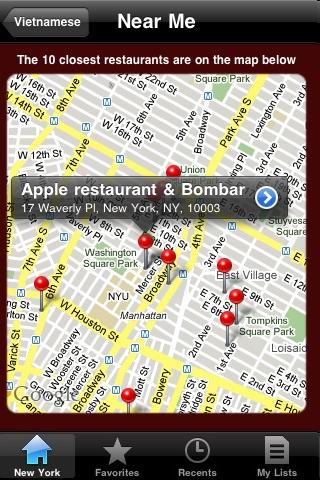
Right now the app supports New York, Boston, San Francisco, Los Angeles, Washington DC, and Chicago (the app also allows you to filter by neighborhoods specific to those cities). I do most of my traveling between New York (city of blinding lights), SF (I left my heart there), LA (California dreamin’), and Chicago (my kind of town) so this app is perfect for me (who’d wanna go anywhere else anyhow?). They also have a corresponding website at www.unimenu.com for those without iPhones. So for all of you who have ever walked into an unknown restaurant and been caught off guard by the prices or selection of the menu, check this app out.
Prediction: SPG rollover nights is on the way but may take away other perks
by Captain G on Aug.18, 2009, under Hotels
While I rarely fill out surveys, I recently completed one for Starwood Preferred Guests; it asked many leading questions that strongly implied:
1. SPG will be implementing rollover nights – if you’ve already achieved status this calendar year, the extra stays/nights will be applied toward next year’s status. This is in response to Marriott’s Elite Rollover Nights program. SPG will probably roll this out in October.
2. If SPG doesn’t implement Rollover Nights, they will definitely be implementing some kind of point acceleration program, again sometime in October. They typically do this every year.
3. SPG may remove the 500 point bonus reward for Platinum members. Currently, when SPG Platinum members check in, they can choose one of three rewards: an extra 500 points added to their account, a $10 credit for the minibar, or a free movie. The leading questions on the survey led me to believe they may take away the 500 bonus points.
Without the 500 point bonus reward program, there is no real incentive to be, or become a Platinum status SPG. Platinum and Gold members accrue the same amount of bonus points and get access to the SPG Club Lounges where available. The 500 bonus points you get at check-in as a Platinum member gives you 1/6 of the way to earning a free night at a category 1 hotel (3000 points per night for week days and 2000 points for weekends). I really hope SPG doesn’t take away the 500 bonus point reward program; otherwise, or I’ll have to consider another chain.
How to get unlimited data on your Sprint MiFi plan
by Captain G on Aug.05, 2009, under Business Tools, Business Travel
I recently upgraded my data card to the new Novatel Wireless MiFi 2200. I will post a product review later on, but I wanted everyone, especially other Sprint customers, to know that upgrading an existing wireless network card contract is absolutely free if you know how to navigate through the hoops. If you spend time on the road without Internet and have to pay for Internet service at hotels, this card is for you (see related post to help justify the cost with your client/management)
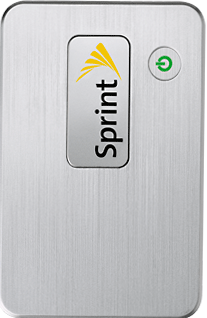
I noticed Sprint was offering the MiFi card for free via an online promotion, and then decided to go to a local store to pick up the card for instant gratification. When I was at the store, the clerk would not match the online promotion and wanted to charge me an activation fee.
I got on the phone with Sprint customer service and told them I had an expiring contract and wanted to cancel. The representative was very nice and offered me an upgrade to another data card. I told the rep I wasn’t interested unless I can get the MiFi card, and keep my existing unlimited data plan; new customers buying the MiFi card service are limited to 5 GB. The representative put me on hold for a minute, and eventually got approval to send me the new MiFi card.
If you currently have a Sprint data card and you have an expired or expiring contract, just call Sprint customer service and inquire about an upgrade to the new MiFi card. If your current data plan has unlimited data, do not accept any new data contract; tell customer service you want the same deal. Otherwise, they will try to put you on the new agreement which has a 5GB data transfer limit.
